Introduction
As the demand for flexible, multi-channel digital experiences grows, more development teams are turning to headless CMS architectures to future-proof their solutions. Optimizely offers two primary options for headless content delivery: the Content Delivery API (CDA) and the newer Optimizely Graph.
But which one should you choose - and why?
I recently faced this exact question while starting a greenfield project with a headless approach. During my research, I noticed that most resources focused deeply on either CDA or Graph individually, but very few compared the two in a practical, side-by-side way.
In this article, I'll share what I learned - highlighting the key differences in performance, scalability, routing, search, and more. If you're planning to build a headless or hybrid app with Optimizely CMS and you're still unsure which path to take, this guide is for you.
What Does "Headless" Mean and Why Is It Such a Hot Topic Recently?
Before we dive in, let's quickly define "headless" and clarify what the fuss is all about!
In a non-headless CMS, templates, rendering logic, and UI all live in one application:
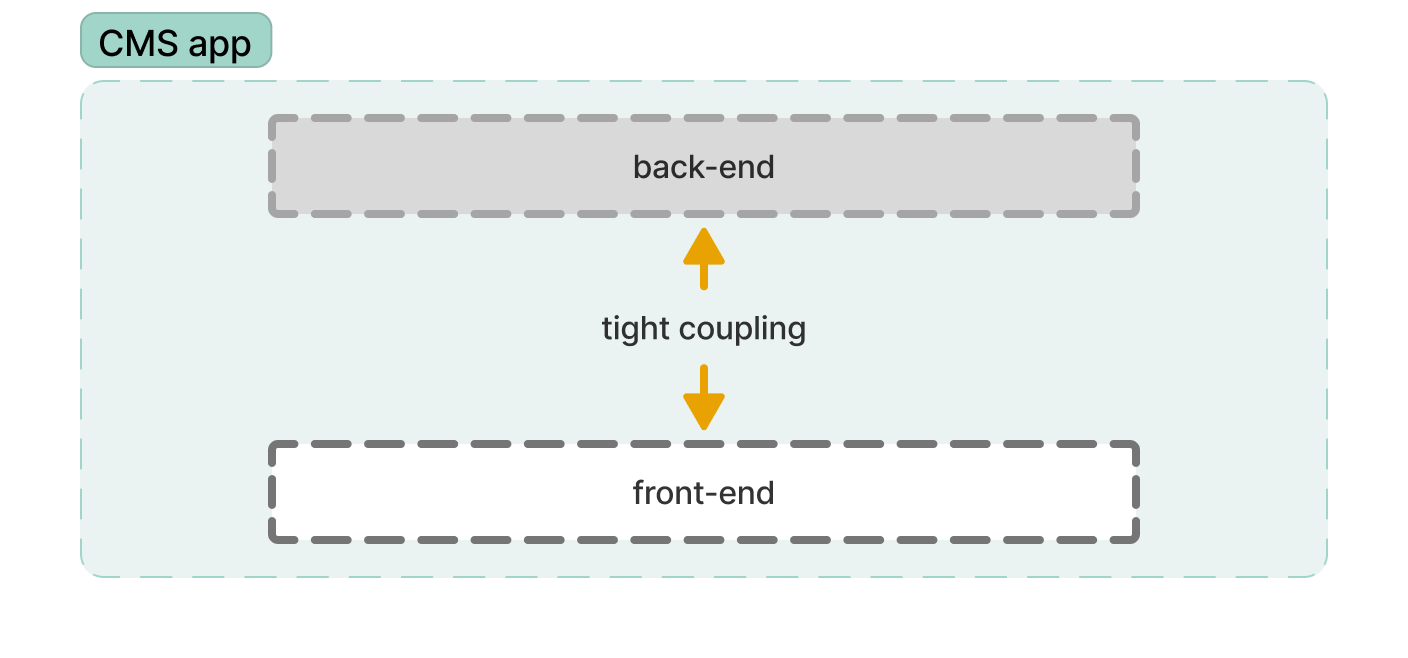
In more complex projects, this approach may introduce a high degree of coupling between the back-end and front-end layers, potentially reducing flexibility.
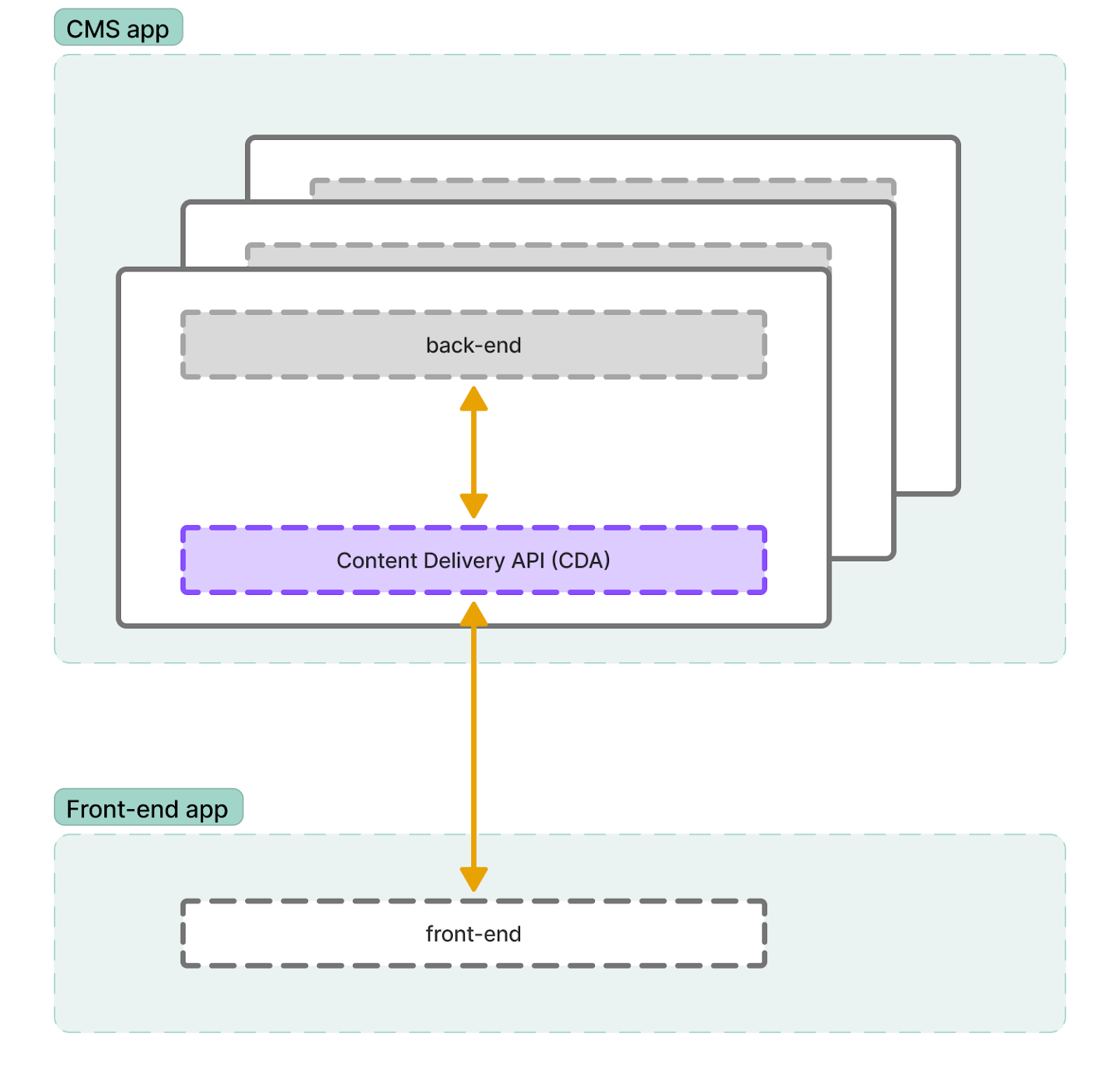
In a headless CMS, the front-end is handled by a separate application. Content is created and stored in the backend but delivered through APIs:
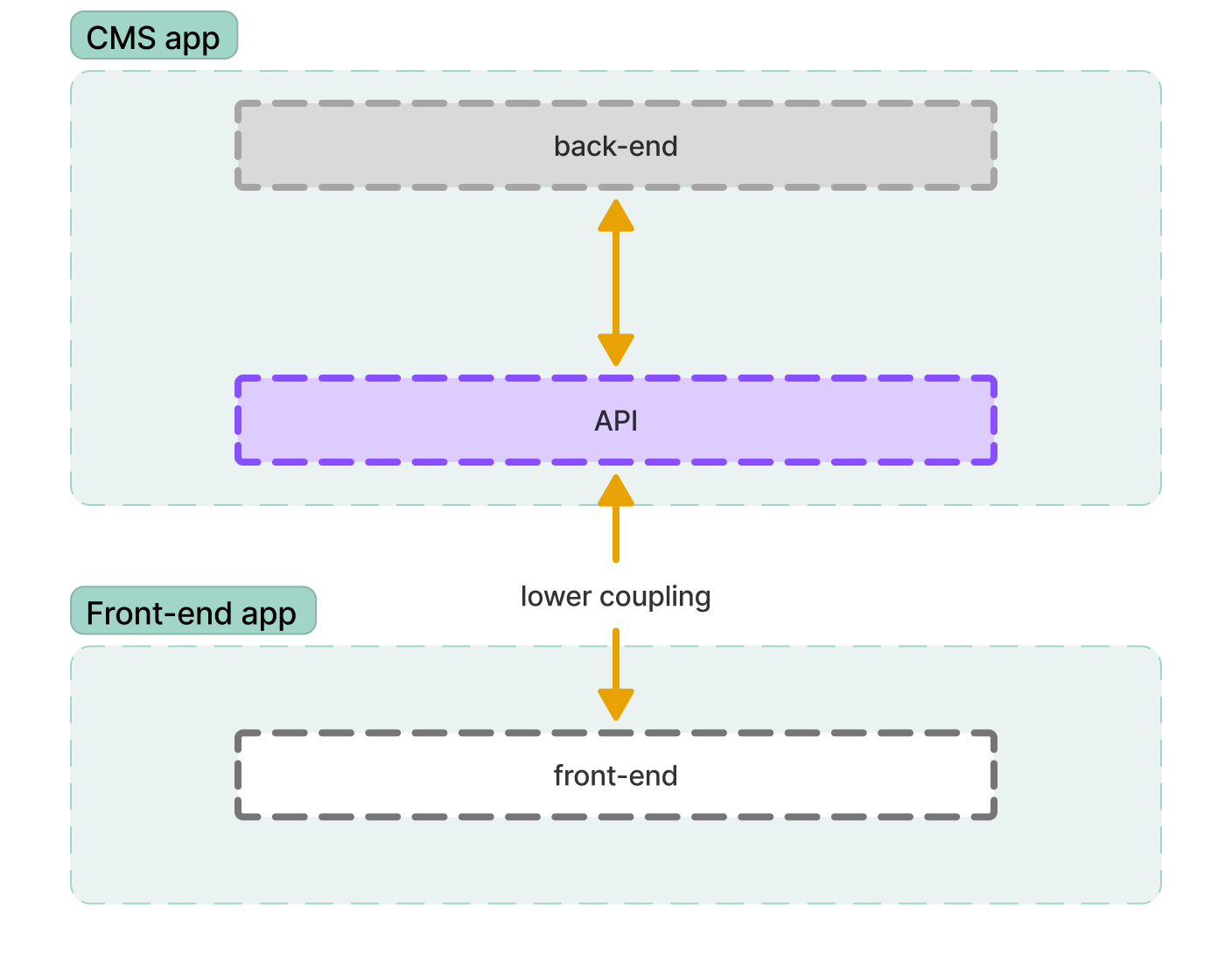
This gives us many advantages that we can utilize to develop more scalable and resilient solutions:
- Front-End Flexibility: Use any technology (React, Vue, Next.js, etc.) to build modern, fast, and dynamic user experiences.
- Omnichannel Delivery: Reuse the same content across websites, mobile apps, kiosks, smart devices, and more.
- Scalability & Performance: Decoupling content delivery from the CMS backend allows for independent scaling and optimized performance.
- Faster Development Cycles: Backend and frontend teams can work in parallel and deploy changes separately accelerating time-to-market.
- Future-Proof Architecture: Easier to swap out or upgrade parts of your stack without replatforming the entire system.
But there's always a second side of a coin. While going "headless" gives us a great flexibility it also introduces new challenges - especially around content delivery, routing, and performance. Let's look at how Optimizely Graph and Content Delivery API help solve those.
Content Delivery & Performance
Content Delivery API is a well established feature of Optimizely PaaS CMS that can be used to fetch data about content. It's installed as a NuGet package and easily configured - Content Delivery API - Quickstart.
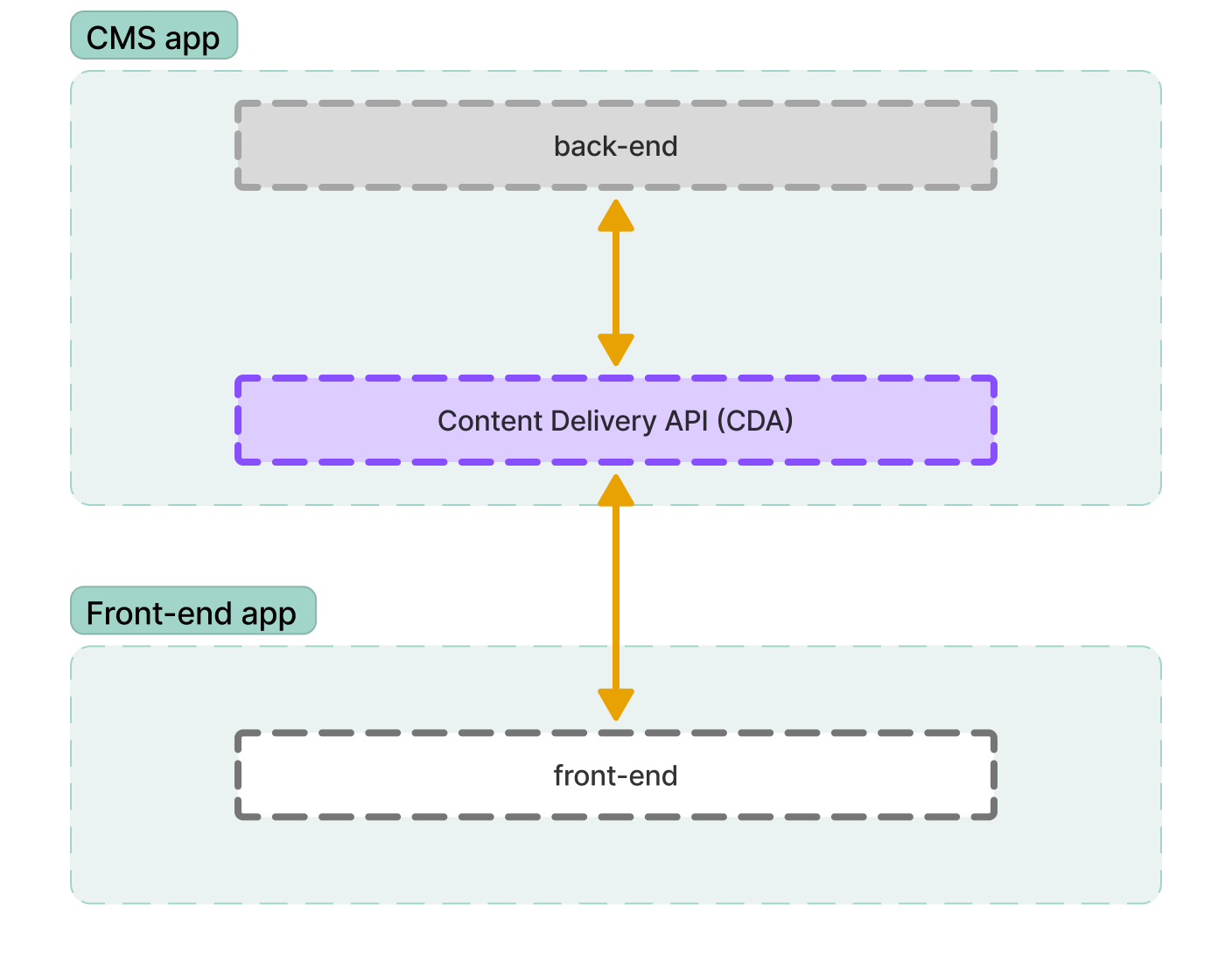
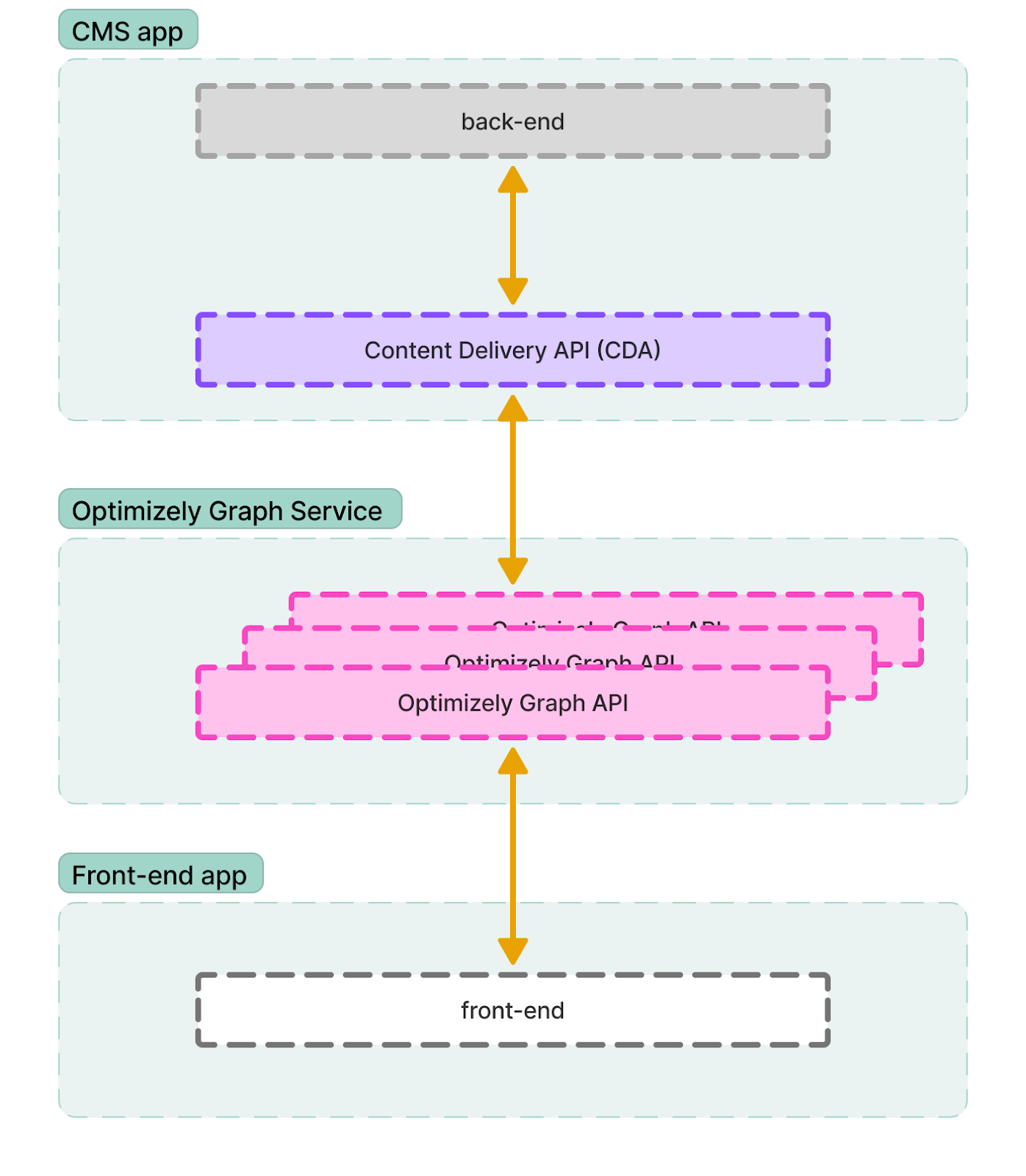
Optimizely Graph extends this concept by introducing an additional layer that operates independently of your CMS instance-similar to how Optimizely Search & Navigation works. It pulls content from your CMS using the Content Delivery API and builds a GraphQL-powered index that serves as the foundation for flexible and efficient content delivery.
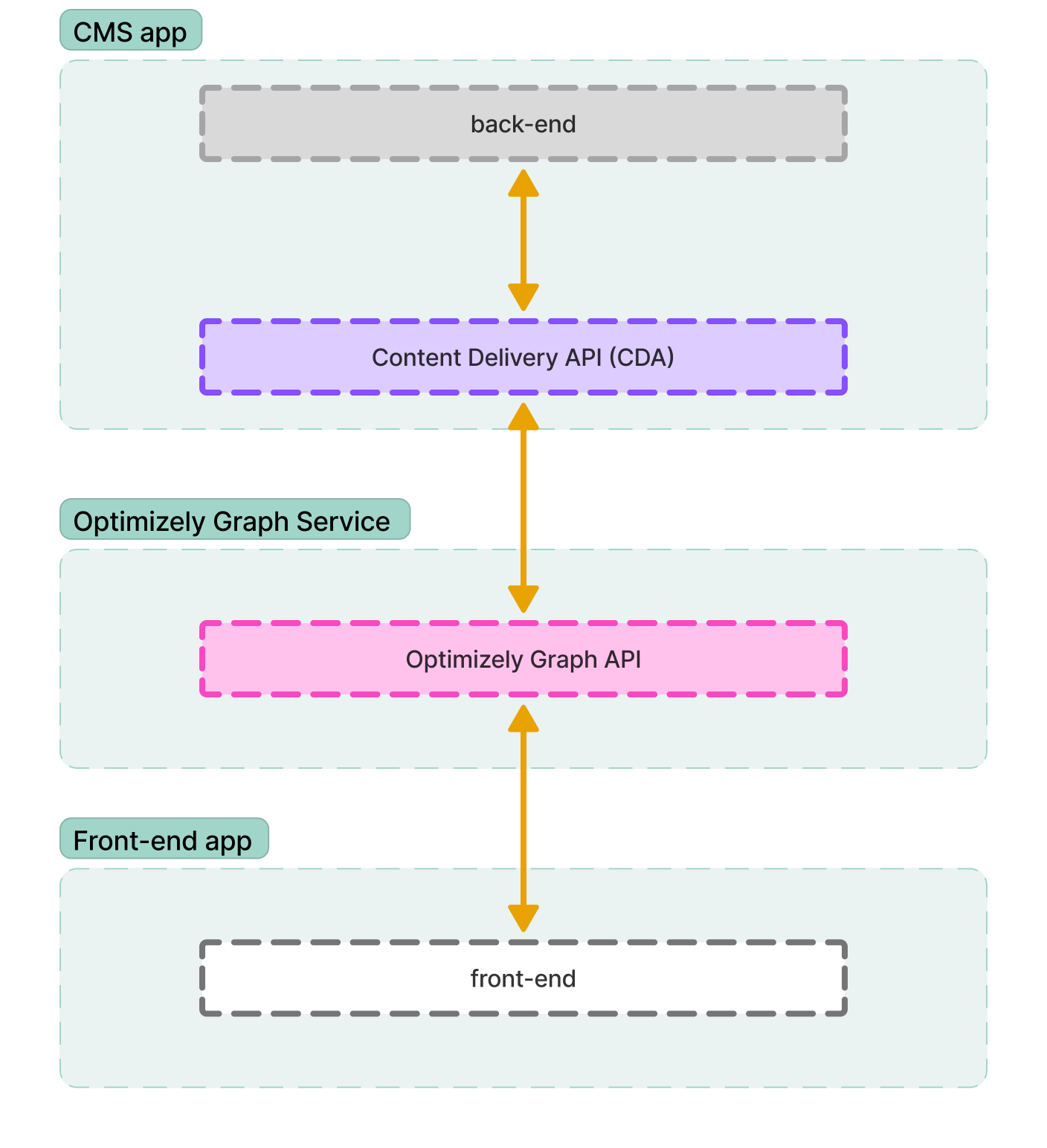
This difference affects how data is being fetched and has a huge impact on scaling possibilities of your solution. While using only Content Delivery API your CMS must scale with your traffic. More frontend traffic = more load on your CMS. For more demanding sites this might be very price inefficient from both CMS licensing and infrastructure costs perspective.
With Optimizely Graph requests go to an external, managed service. Your CMS publishes content to the Graph service, and that service handles scaling independently. This offloads traffic from your CMS and improves resilience.
Avoiding Data Over-Fetching
Reducing the size and number of requests matters in any modern frontend. A typical page might include nested blocks and related media - and fetching that efficiently is key.
Content Delivery API
In some cases you'll need to customize your CDA responses to expand data structures (Expanding Nested Blocks – Optimizely Docs) or enrich data being returned.
It works, but requires effort and custom configuration.
Optimizely Graph
GraphQL's design shines here.
You can define exactly which fields, blocks, and media you want in one query.
Great for reducing payloads and avoiding over-fetching.
Routing
Regardless of the front-end framework you're responsible for routing in a headless setup. You need to map frontend routes to your Optimizely content structure.
Content Delivery API
Supports built-in URL resolution via:
/api/episerver/v3.0/content?contentUrl=/about-usThis makes it easier to match CMS structure without writing custom logic.
Optimizely Graph
You can use the ContentLink property, which is indexed by Optimizely Graph by default, to locate the page that matches a given URL.
SitePageData(
    where: {
      ContentLink: {
        Url: {
          eq: "url-to-your-page"
        }
      }
    }
){
"data": {
"SiteBasePage": {
"items": [
{
"ContentLink": {
"Url": "/en/exploring-the-future-of-education-the-rise-of-online-learning-platforms/"
}
}
]
}
}
}Alternatively you could implement similar solution as in Optimizely SaaS where each page contains a metadata Url property:
BlogPostPage {
  items {
    _metadata {
      url {
        default
        base
        graph
        hierarchical
        internal
        type
      }
    }
  }
}{
"data": {
"BlogPostPage": {
"items": [
{
"_metadata": {
"url": {
"default": "/insights/the-benefits-of-downsizing-in-retirement/",
"base": "https://<your-site-base-url>",
"graph": "graph://cms/BlogPostPage/5964702069e64c42ae151861858f0aa7",
"hierarchical": "/insights/the-benefits-of-downsizing-in-retirement/",
"internal": "cms://content/5964702069e64c42ae151861858f0aa7?loc=en&ver=20",
"type": "HIERARCHICAL"
}
}
}
]
}
}
}On-Page Editing
One of the standout features of Optimizely CMS is its on-page editing, which allows content authors to see changes live as they work. However, in a fully headless setup, this editing experience doesn't come for free.
In both Content Delivery API and Optimizely Graph approaches, on-page editing requires custom implementation to integrate with the CMS editor and preview modes.
Content Delivery API
Using CDA, you can support on-page editing by configuring your front-end app to detect Optimizely's Edit Mode and handle it accordingly. Key requirements include:
- Supporting query parameters like
?epieditmode=trueand?id=123 - Resolving content in preview or draft mode
- Ensuring that URLs resolve properly to content in CMS edit view
A helpful reference implementation can be found here: On-page editing with Optimizely CMS on an externally hosted site.
This setup allows content editors to use the familiar CMS UI while seeing a live rendering of content changes on your front-end app - provided it's properly connected via CDA.
Optimizely Graph
Optimizely Graph also supports on-page editing, but in a slightly different way. The key concept is that Graph receives published and preview content from the CMS, and you can query that using specific parameters or endpoints.
To enable on-page editing, you'll need to:
- Configure your front-end to recognize CMS editor states
- Support preview tokens or versions (e.g., previewing unpublished content)
- Adjust GraphQL queries to fetch content in preview mode
Detailed documentation and setup guide available here: On-page editing using Optimizely Graph.
While Graph adds more flexibility in querying and rendering, it also requires a deeper understanding of how preview states are handled across the CMS and Graph layers.
Search Capabilities
Both Optimizely Graph and the Content Delivery API support search, but the mechanisms and features differ significantly.
Content Delivery API
- Built on Search & Navigation (formerly Find)
- Supports free-text search
- Doesn't support semantic search
- Enables personalized search results (visitor groups)
- API offers only basic filtering and ordering. To utilize more sophisticated features like boosting a custom implementation of search API and Search & Navigation on the BE side is needed.
Optimizely Graph
- Doesn't require Search & Navigation
- Supports free-text and semantic search
- Offers advanced search out-of-the-box (boosting, filters, autocomplete, and more)
- No personalization support (as of now)
- Offers greater flexibility, as search can be implemented on either the front-end or back-end, depending on your architecture.
Licensing
Licensing costs will ultimately depend on your Optimizely contract, but there are some structural differences worth noting when choosing between CDA and Graph.
Content Delivery API
- May require a separate license for Search & Navigation
- More frontend traffic usually means more CMS app instances → higher infrastructure costs for self-hosted solutions
- More CMS instances = potentially more base licenses required
Optimizely Graph
- May require a separate license for Optimizely Graph
- Content is delivered via a scalable managed service, reducing the load (and cost) on the CMS
- No need for Search & Navigation license
- Can reduce the number of required CMS licenses, especially in high-traffic apps
Summary
| Feature | Content Delivery API (CDA) | Optimizely Graph |
|---|---|---|
| API Type | REST | GraphQL |
| Scaling | Tied to CMS instance | External managed service |
| Routing | Built-in URL resolution | Custom slug/url-based |
| Nested Content Fetch | Custom config required | Native via query |
| Search | Search & Navigation (optional) | Built-in, semantic |
| Personalization | Supported | Not supported |
| On-page Editing | Supported with setup | Supported with more setup |
Content Delivery API
Pros:
- Popular and well known REST approach
- Easier routing with built-in URL resolution
- Doesn't require additional licenses
Cons:
- Need to scale with your CMS
- Custom configuration required for some data fetching scenarios
Optimizely Graph
Pros:
- Query exactly what you need
- One request for nested blocks, media, etc.
- More efficient, flexible, and scalable
- Great for modern front-end frameworks
Cons:
- More complex routing based on content url or slug
- May require separate license
Final Thoughts
Going headless with Optimizely unlocks a lot of freedom and flexibility. Whether you choose CDA or Optimizely Graph - you're in a great place to build fast, modern, and scalable experiences.
Got questions or experiences with either? I'd love to hear your take!